
Important information for Winter Session 2026
ELLA’s Winter Session 2026 classes run from January 12 through February 26, 2026.
Frequently Asked Questions (FAQs)
Courses FAQ
Winter Session 2026 is online, so you can register and attend from anywhere in the world (as long as you have internet service!). Courses are delivered via Zoom, which you will need to download and install on your computer or device prior to the start date.
Registration opens on the morning of Tuesday, December 2, 2025. Please be patient as the first morning of registration is usually very busy on the website.
You must be a current member of ELLA. Memberships run from Oct 1 to Sept 30 and cost $25. If you are new to ELLA, go to My-ella.com and click on Memberships, and then on the Add to Cart button under Become a Member.
If you have been a member, log in, click on My Account, and then on My Membership. A message will pop up letting you know if you have an active membership. To renew, scroll down to Looking to renew for a new year, and then click on Click here to start your renewal.
Courses range in price from $40 to $85 and we have one art instruction course for $160.
Bursaries are available to persons with financial limitations. Approved individuals are eligible for a free annual membership and a bursary of $85 to be used against the registration fee of Winter Session courses. Spring Session courses will be subject to a different bursary amount.
To apply, click on Courses and then scroll down and click on Bursary Information. The criteria for application and the application form are on that page.
Yes, but the system will not allow you to purchase courses that overlap. I thought we allowed overlaps if they were recorded?
This year seven courses will be recorded as they are presented. If you are registered in the course, the recordings will be available for viewing only, through your membership account for 14 days. Access to the recordings ends 7 days after the end of the course. They will not be available to download.
Registration is done online on my-ella.com. Log in to your account, then click on the Courses page.
Scroll down to see the course boxes. Click on the one you are interested in and then click on Add to Cart. You can then click on Courses again to be taken back to the Courses page and continue shopping.
When you are done, click on your shopping cart (located in the upper right corner) and then View Cart or Checkout.
If a course is full, you will not be able to add it to your cart, but you can click on the Waitlist button and we will let you know if space becomes available.
If you have trouble, you can call us at 825-901-0515 or use the Contact Us form on our website.
Click on Contact Us and fill out the contact form, telling us what course you want and a time you are available. We will call you to register you, as we must override the system.
For Winter Session courses, refunds are given up to 48 hours before the first class starts for a course. Refunds will not be given beyond that unless a course is cancelled by ELLA.
Click on Contact Us to let us know if you would like to withdraw.
Please note that the refund policy for the In-person Spring Session differs from the Winter Session Policy.
Courses may be cancelled due to low enrollment or instructor unavailability. In the event of a cancellation, you will be contacted by ELLA Operations Volunteers and receive a full refund.
Before any classes start, you can switch to another class subject to availability. Click on Contact Us to send us an email with the particulars. We will contact you. Refunds will be given if the substituted class costs less. Payments will be required if the substituted class costs more.
Once a session begins, careful consideration will be given to any transfer requests. A transfer may not be possible.
An invitation to attend the class is sent out via email, after the sale of classes end, which is 48 hours before the first class starts. The invite will be sent usually the day before the first class. The invitation has the zoom link and basic zoom instructions. If you do not have this email, check your spam or junk folder. It may have gone there inadvertently. If you still do not have it, contact us immediately using the Contact Us form on the my-ella.com website. We can not guarantee that we will get you into the 1st class if you email us 5 minutes before the start, particularly if your class starts outside of office hours (9 to 3 weekdays).
Log In to your Account. Click on My Account near the top of the page. Scroll down and click on Your Courses. Your courses are listed in table format. Click on the course name in the first column. The course page opens. Scroll down until you see Course Resources. The instructor posts all shared information in this section.
Log In to your Account. Click on My Account near the top of the page. Scroll down and click on Email Preferences. Click on Resubscribe to General Emails and fill in the boxes and click on Subscribe.
To see past messages, click on My Messages along the left side.
Noon Hour Programs FAQ
Every Friday during Winter Session, ELLA presents a Noon Hour Speaker. These presentations are free to all ELLA active members and are recorded so you can watch them live or watch them later. To access Log In to your Account. Click on My Account. Then click on Noon Hour Presentations. The presentations are listed.
Click on the Zoom Link button to watch live or to watch the recording later.
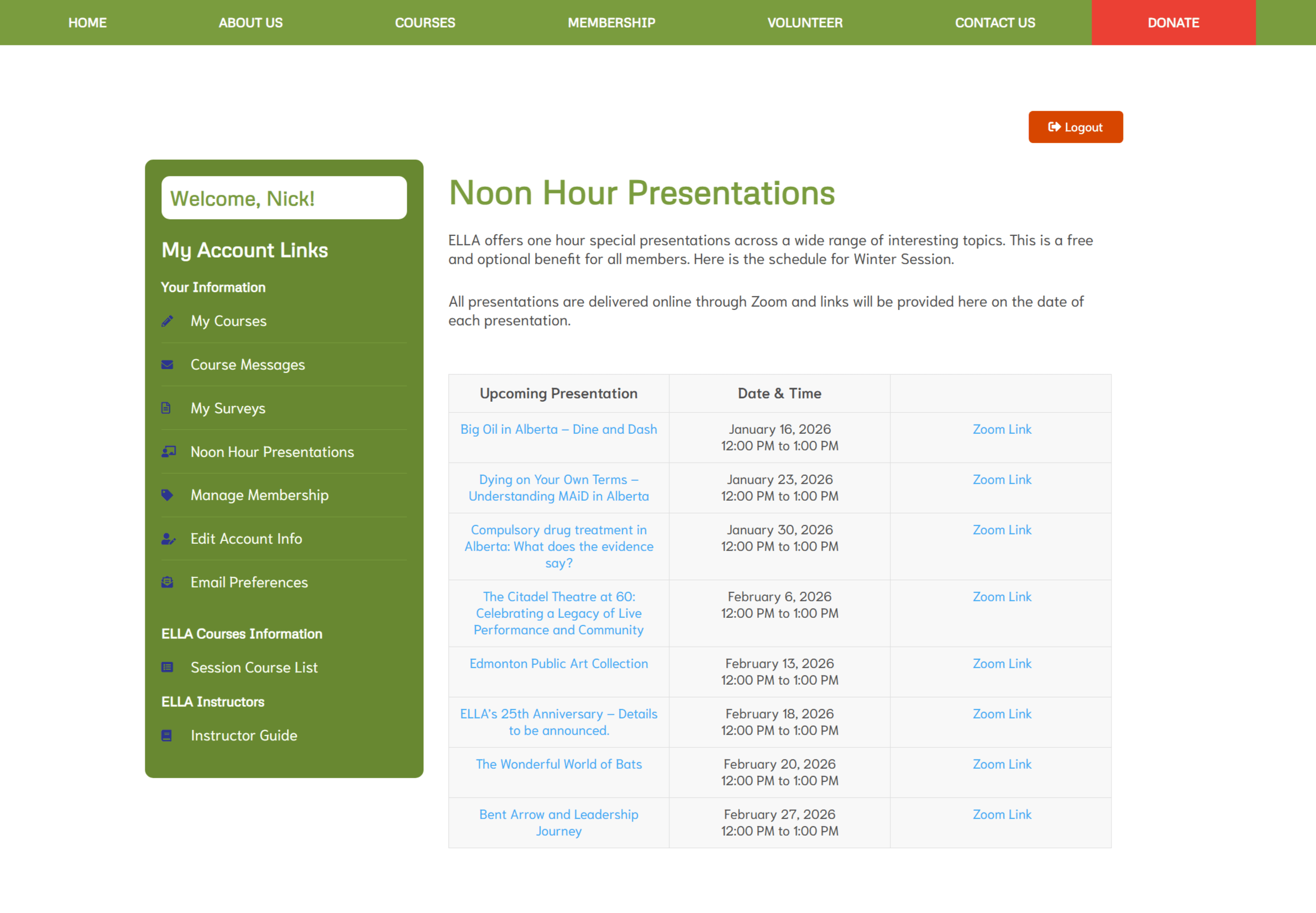
Sometimes presenters make available their power point presentation or other information. To access these materials, log into your account. Click on My Account. Click on Noon Hour Presentations. Click on the title of the noon hour presentation and scroll down to Presentation Resources.